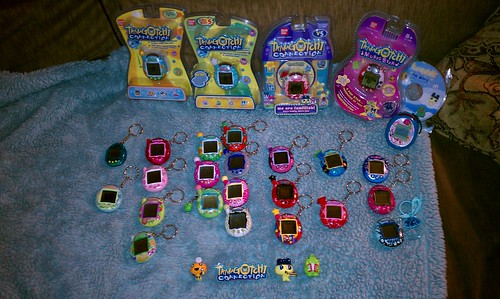
I'm just wondering. I have one, but I don't remember which one it is. Its a clear blue-green color with yellow buttons. Its in my pic all the way to left, if you can see it. Its tiny lol.
The differences are also touched upon in THIS topic. From what I can see at a quick glance, you most likely have a P1 because I generally associate that shell color with P1s and plus, the egg doesn't appear to say "Tamagotchi" up at the topic. I'd have to get a closer look at it to tell for sure though.
The only way to tell the difference between a P1 and a P2, without starting it up to check things like which games it plays is to look at the background designs (as explained above). Binary has posted some photos of the two different styles:
You guys are awesome! It has a checkered background, so P1. I had bought it a few years back and my hubby accidentaly threw out the box because he thought I was throwing it out So I was stuck with just the tama and no clue how to tell. I've only run it once before a while back. It's just fun to have a peice of tama history



 that's odd. they worked for me. i don't have a tama zone account either.

 From what I can see at a quick glance, you most likely have a P1 because I generally associate that shell color with P1s and plus, the egg doesn't appear to say "Tamagotchi" up at the topic. I'd have to get a closer look at it to tell for sure though.


